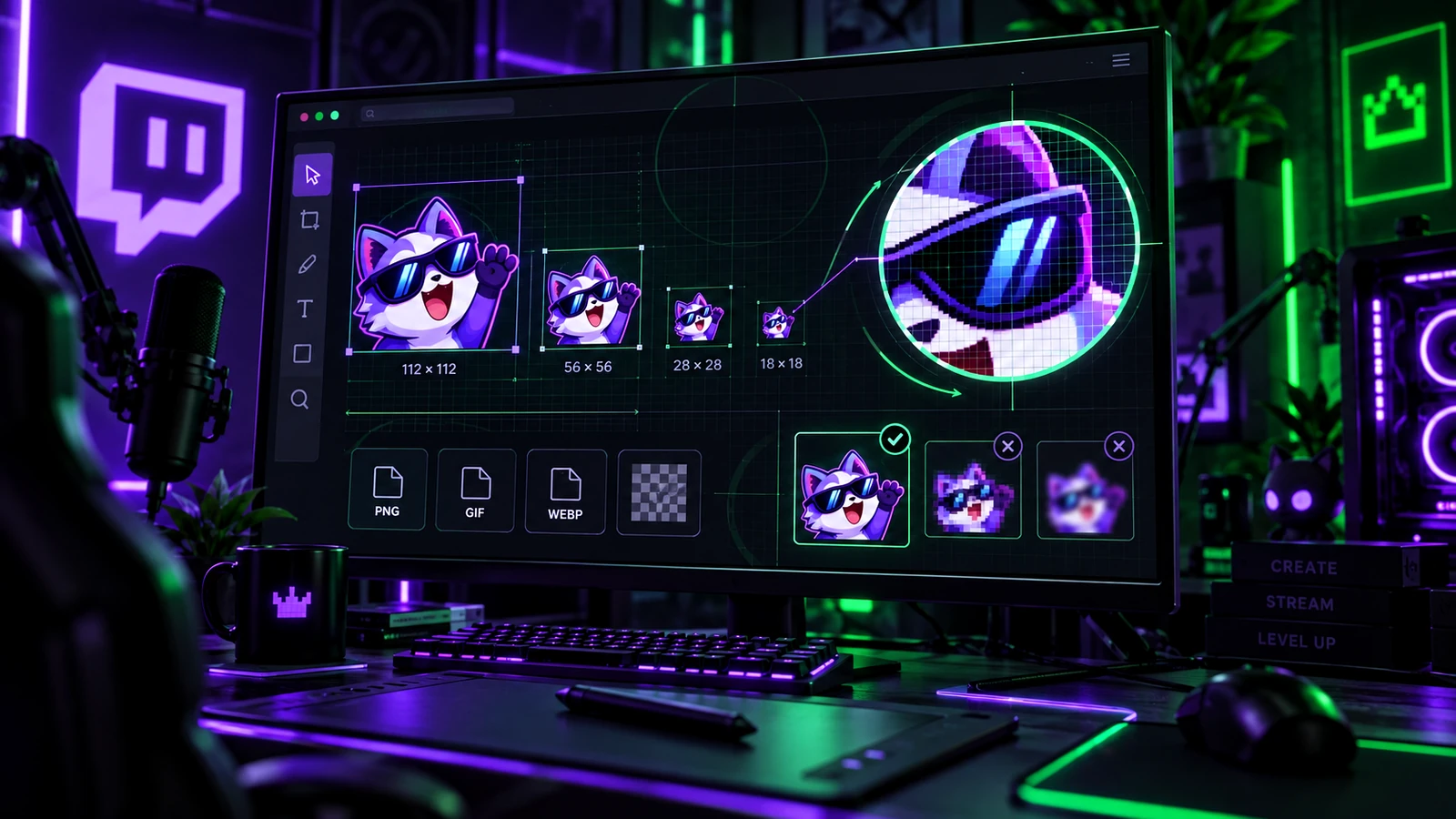
Twitch emotes are tiny in chat, so technical requirements and visual simplification matter more than they do for most stream graphics. As of 2026, Twitch supports an auto-resize workflow where you upload one larger square source, or a manual workflow where you provide the three display sizes yourself. This guide separates the current platform requirements from the design decisions that make an emote readable.
The Three Manual Twitch Emote Sizes
Manual mode uses 28×28, 56×56, and 112×112 pixel versions of the same emote. These are not three different drawings. They are three exports of the same concept optimized for different display contexts. Always inspect the 28×28 version because that is where fine lines, small eyes, fingers, and text are most likely to disappear.
Auto-Resize Mode
Twitch's current emote formatting guidance allows one square source between 112×112 and 4096×4096 pixels when auto-resize is enabled. For standard static emotes, that source is a PNG. Twitch then creates the smaller display sizes. Auto-resize is convenient, but still preview the generated results. A high-resolution source does not guarantee that a detailed design will remain readable when reduced.
Static Emote Format and Transparency
Standard Twitch emotes use PNG format and should be square. Twitch's current guidelines call for a fully transparent background for standard emotes. Design the silhouette so it remains recognizable against both light and dark chat themes rather than depending on one background color.
Standard Emote File Size
For auto-resize, Twitch currently limits the standard source file to 1 MB. Twitch's Subscriber Emote Guide states that manual standard uploads should each be under 100 KB. Export efficiently and avoid adding invisible canvas space or unnecessary metadata when you are close to the limit.
Animated Twitch Emote Requirements
Animated emotes use GIF. Twitch allows either one square auto-resize GIF between 112×112 and 4096×4096 pixels or three manual GIFs at 28×28, 56×56, and 112×112. Twitch's current formatting page limits auto-resize animated files to 1 MB and manual animated files to 512 KB each. Animated GIFs can contain up to 60 frames, and Twitch also limits rapid flashing behavior.
Why 28×28 Should Drive the Art Direction
A detailed 1000-pixel illustration can look beautiful and still fail as an emote. At 28 pixels, simplify the face, exaggerate the expression, increase silhouette contrast, remove tiny accessories, and avoid long words. Zooming out repeatedly while drawing is more effective than trying to repair readability after export.
Use Large Features and Simple Shapes
Eyes, mouth, hands, props, and reaction symbols often need to be larger than realistic proportions so the idea survives reduction. Clean outlines and limited color regions are easier to read than subtle gradients and thin texture. An emote is closer to an icon than a full illustration.
Text in Emotes
Text can work when it is extremely short and bold, but long words become illegible quickly. If the joke requires a sentence, the concept probably belongs in chat text, an alert, or another graphic rather than an emote. Test every letter at 28×28 and check that it does not blend into the character.
Animated Thumbnail and First Frame
Twitch uses the first frame of an animated emote as the default static thumbnail unless you provide a custom thumbnail where supported. Design the first frame so the emote is still recognizable when motion is not playing. This also improves the experience for contexts where animation is reduced or paused.
Create a Master, Then Export the Platform Sizes
Keep an editable master larger than the final display size, then export according to Twitch's current upload mode. Do not make the master so detailed that it can only work at full resolution. Maintain a consistent emote style sheet so future expressions match the existing set.
Platform Requirements Can Change
This guide reflects Twitch's current help documentation in 2026, but platform upload requirements can change. Before exporting a large commissioned set, confirm the Creator Dashboard upload interface and current Twitch emote help pages. That final check prevents having to re-export dozens of files because of a platform update.
Final Take
For Twitch emotes, design quality is inseparable from small-size readability. Use the current 28×28, 56×56, and 112×112 manual sizes or Twitch's auto-resize workflow, keep static art transparent, and build animation inside the platform limits. For the creative choice between motion and still art, continue with Static vs Animated Twitch Emotes. For a coordinated creator-brand package, review custom Twitch overlay design, our portfolio, and stream design pricing.
Related reading: compare motion in Static vs Animated Twitch Emotes, connect the set to your creator brand with Twitch Channel Branding Guide, and coordinate channel information graphics with Twitch Panels Guide.