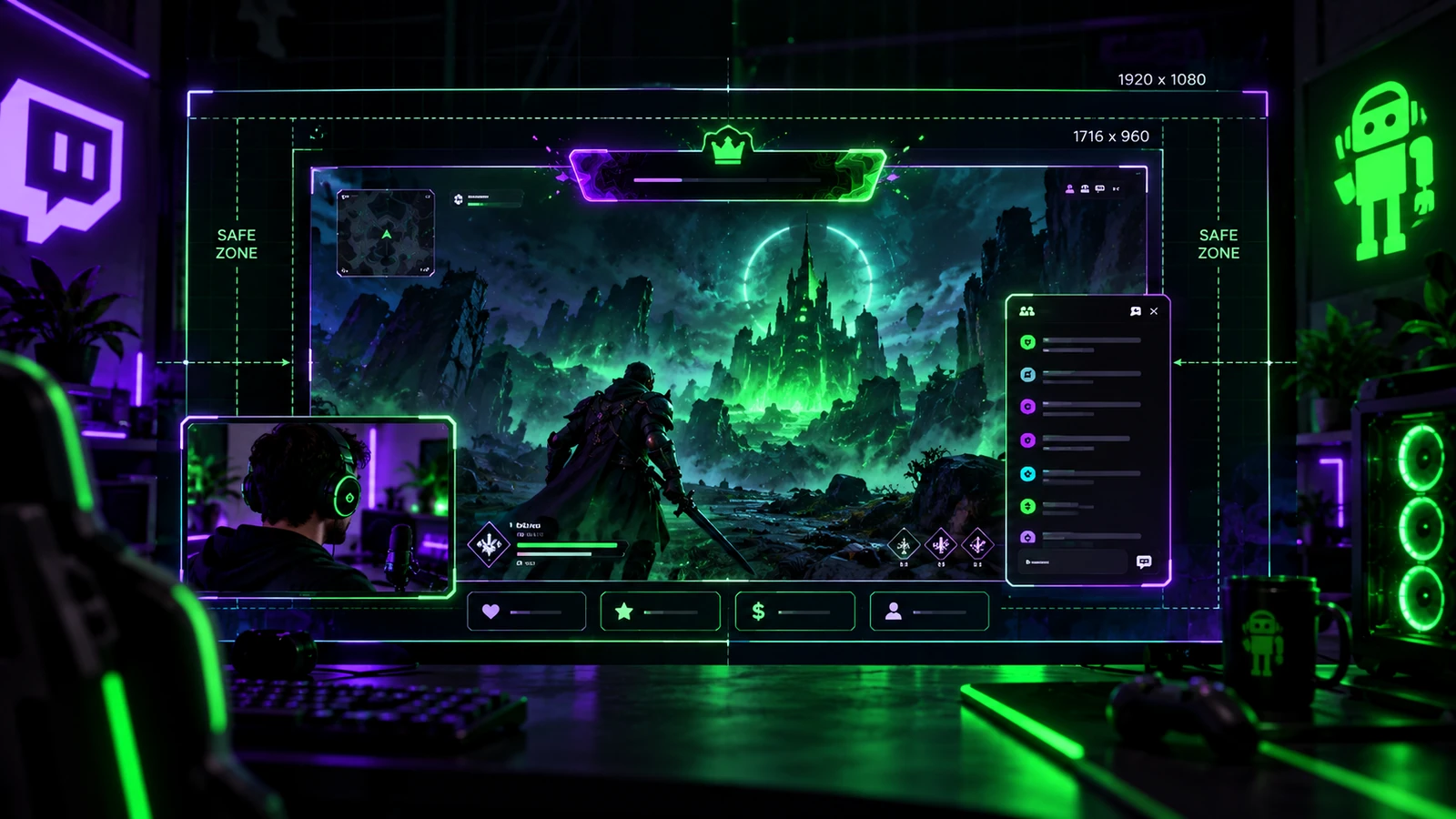
There is no single “Twitch overlay size” because an overlay is part of your broadcast canvas, not a separate platform upload slot with one universal dimension. The correct size depends on the OBS canvas and output workflow you use, the scene layout, and whether an asset fills the frame or occupies only one region. A good size guide therefore starts with the video canvas and works inward.
Design to the OBS Base Canvas
Create full-scene graphics at the same aspect ratio and intended pixel dimensions as your OBS base canvas whenever possible. A common horizontal workflow uses a 16:9 Full HD canvas, while some streamers use other resolutions depending on hardware, output, or platform features. Avoid designing a full-scene overlay at a random small size and then stretching it across the broadcast.
1920×1080 Is Common, Not a Universal Rule
1920×1080 is a common working canvas for 16:9 streaming graphics because it provides a practical Full HD design space. Twitch's Enhanced Broadcasting documentation also discusses 1920×1080 and 1280×720 as recommended paired base/output choices for many standard workflows. Your actual OBS configuration should control the design. Do not change a stable stream setup only to match a graphic template.
Full-Screen Scenes vs Overlay Elements
A Starting Soon background may fill the entire canvas. A webcam frame should be designed around the camera region. A corner label or alert frame needs only the dimensions required for that element. Keep transparent empty space to a minimum when it serves no purpose. Separate assets are easier to position and replace than one flattened file containing every element.
Safe Zones Are About Game UI Too
Overlay safe zones are not only about platform cropping. They protect health bars, minimaps, subtitles, inventory slots, ability icons, and other game interface elements. Use screenshots from your real games during design. If you stream several games, avoid locking permanent branding into areas that frequently contain important UI.
Webcam Frame Size Depends on the Scene
Do not choose a webcam frame size from a generic percentage. Start with how much facial detail matters in that scene. A gameplay scene may use a smaller camera; Just Chatting may use a much larger camera or multiple guest regions. Design the frame to the intended crop and test with the real camera feed.
Text Must Survive Reduced Viewing Size
A 1080p design can contain text that looks comfortable in Photoshop but becomes unreadable in a small player. Preview the entire scene at reduced size before approving labels, goals, sponsor names, and chat text. Important information should not require full-screen desktop viewing.
Avoid Upscaling Small Raster Assets
Logos, icons, and illustrations should be exported large enough for their maximum intended display size. Upscaling a small raster image can create soft edges, especially around typography and line art. Keep vector or editable masters where possible and export the needed raster size for the actual scene.
Plan for Newer Twitch Formats Carefully
Twitch now supports newer workflows such as Enhanced Broadcasting, higher-resolution output for eligible creators, and dual-format features. That does not mean every existing 16:9 overlay should suddenly be redesigned. It does mean creators using alternate formats should think about which elements can survive a different crop or layout. Keep critical branding away from fragile edges and maintain editable masters so alternate exports can be created later.
Profile Graphics Use Different Specifications
Do not confuse stream-overlay dimensions with Twitch profile graphics. Profile banners, panels, emotes, and other channel assets have their own requirements. For example, Twitch currently recommends 1200×480 pixels for the profile banner. Use Twitch Banner Size Guide and Twitch Emote Size Guide for those platform-specific assets.
A Practical Export Workflow
Confirm the OBS canvas, design the scene at that scale, export static transparency where required, keep editable masters, and test the result in OBS. Record several minutes of real content and review at full and reduced sizes. Only then create alternate sizes or platform variants. Designing every possible export before testing the main scene creates unnecessary work.
Final Take
Twitch overlay sizing is a layout problem built around your broadcast canvas. Match the scene to OBS, protect game UI, test text at smaller viewing sizes, and keep masters flexible enough for future formats. If you need graphics planned around a specific stream setup, review custom Twitch overlay design, our portfolio, and stream design pricing.
Related reading: coordinate scene structure with Best OBS Overlay Layout, understand source delivery with OBS Overlay Formats and Performance, and compare channel artwork in Twitch Banner Size Guide.